How to Create a GS1 DataMatrix Label for UDI Medical Devices
Step-by-step practical guide to encoding GTIN (01), dates, lot, and serial numbers into compliant GS1 DataMatrix symbols and printing physical labels.
To ensure the global traceability of medical devices, regulatory frameworks such as FDA UDI (United States) and EU MDR/IVDR (European Union) mandate standardized automatic identification carriers on device packages and labeling. GS1 DataMatrix is a compact carrier used in healthcare workflows; choose the carrier required for your device and receiving process.
This comprehensive guide explains how to structure your GS1 fields, size your physical labels in millimeters, position human-readable text, and export production-ready files.
1. Essential GS1 Application Identifiers (AIs)
A valid GS1 DataMatrix barcode does not simply encode freeform text or a generic URL. In the GS1 standard, distinct data elements are categorized by two- to four-digit Application Identifiers (AIs):
- (01) GTIN (Global Trade Item Number): The 14-digit identifier assigned to your device packaging level. Acts as the static Device Identifier (UDI-DI).
- (11) Production Date: YYMMDD date format indicating date of manufacture (e.g. 260921).
- (17) Expiration Date: YYMMDD date format indicating product shelf life or expiration.
- (10) Batch / Lot Number: Alphanumeric variable-length string (up to 20 characters).
- (21) Serial Number: Unique alphanumeric device serial number (up to 20 characters).
Crucial Rule - The FNC1 Separator: When variable-length fields such as Batch/Lot (10) are followed by other data fields (such as Serial 21), a non-printable FNC1 separator (represented in reader output as ASCII 29 / Group Separator `␝`) delimiter must be inserted between them. Without FNC1, barcode scanners cannot reliably determine where the lot number ends and the serial number begins. UDImaker automatically injects required FNC1 control characters into the raw barcode payload.
2. Sample GS1 DataMatrix Label Layout
Here is a standard medical device layout incorporating the 2D matrix symbol alongside structured Human-Readable Interpretation (HRI):
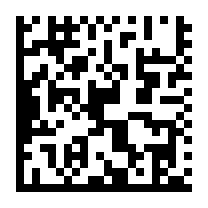
A compliant packaging label requires both:
- The Machine-Readable Carrier: The 2D DataMatrix symbol containing encoded AIs and FNC1 characters.
- Human-Readable Interpretation (HRI): Clear text with AI numbers enclosed in parentheses, ensuring clinic personnel can manually read the values if a scanner is unavailable.
3. Physical Label Dimensions & Quiet Zone Rules
Scanning reliability depends heavily on physical module size (X-dimension) and surrounding clear margin:
- Module Size (X-Dimension): Choose the permitted size from the relevant GS1 application specification and the actual printer resolution. Align modules with suitable physical printer dots and verify the final label; a single universal size cannot guarantee a passing grade.
- Quiet Zone: A mandatory clear margin of at least 1 module (ideally 2 modules) of unobstructed white space must surround all four borders of the DataMatrix square.
- Millimeter Precision: When designing labels, always work in actual millimeter units (e.g. 80×40 mm or 60×30 mm) rather than arbitrary screen pixels.
4. Create and Export in UDImaker
You can construct the label and inspect its data in the browser. This does not certify the physical print or the device's regulatory compliance:
- Open the dedicated GS1 DataMatrix Generator.
- Enter your product's assigned 14-digit GTIN and check the boxes for Lot, Expiry, or Serial numbers. The sample GTIN 09506000134352 is for demonstration, not allocation to your product.
- Fine-tune your layout: add device names, ISO 15223-1 regulatory symbols, or custom borders.
- With a verified account, export vector SVG or a PDF containing a 300 DPI image. Print at actual size, compare the decoded fields with the job record and perform the required physical quality checks.
Sources and technical review
Relevant primary references are listed below. These guides explain the design workflow; confirm current sector requirements and local regulations before production use.